

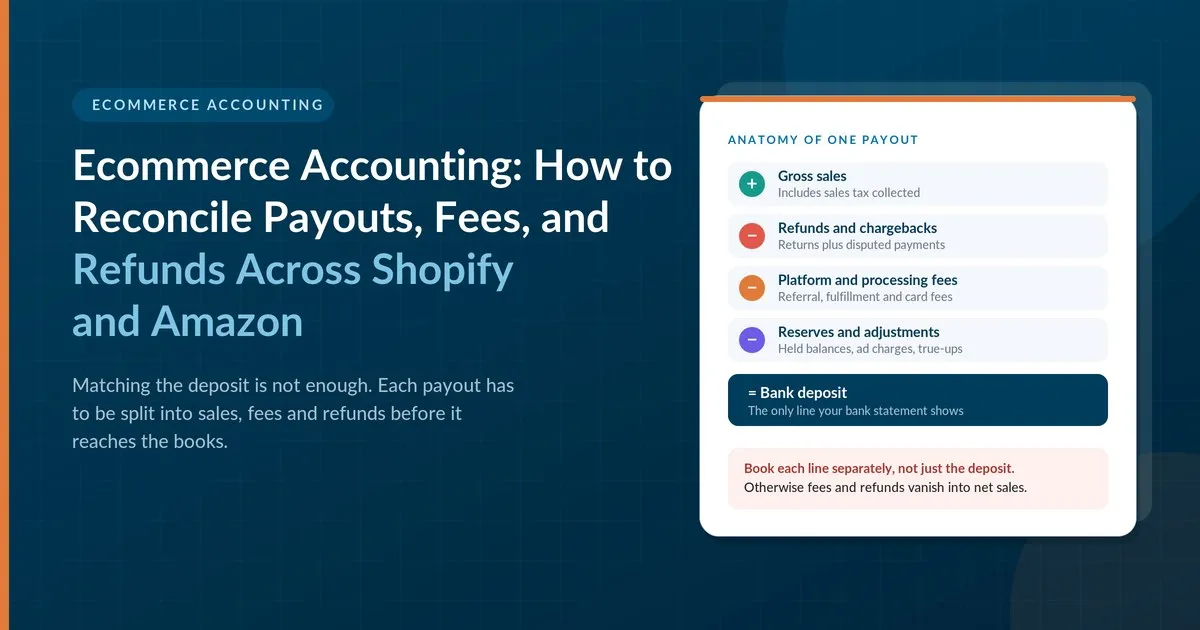
The deposit hit your bank account this morning. It is $9,180. Your Shopify dashboard says you sold $10,000 this week. Somewhere between those two numbers sit fees, refunds, and timing, and your books need to explain every dollar of the gap.
This is the core problem in ecommerce accounting. Sales platforms report one number, and banks receive another. This guide shows how to bridge the two for Shopify and Amazon, using a method that keeps your revenue, fees, and sales tax accurate.
Why Bank Deposits Never Match Sales
Platforms do not send you your sales. They send you what is left after deductions. A payout usually reflects four things at once: sales, refunds, platform fees, and timing.
Sales are recorded when the order is placed. Refunds are subtracted when the customer returns an item, often weeks later. Fees are taken before the payout, so you never see them as a separate bank transaction. Timing matters because a payout covers a batch of days, not a calendar month.
If you record each deposit as income, three things go wrong. Revenue is understated because fees are buried. Expenses are understated because the same fees never appear. And your month-end totals include sales from the previous period. The fix is to record the underlying activity first and the bank deposit second.
The Clearing Account Method
The cleanest approach uses a clearing account. This is a temporary holding account that collects each platform’s activity and then zeroes out when the payout arrives.
Here is how it works in four steps:
- Record gross sales from the platform report into the clearing account.
- Record refunds, fees, and adjustments from the same report into the clearing account.
- Record the bank deposit against the clearing account.
- Check that the clearing account balance returns to zero.
If the balance does not return to zero, something is missing. That is the signal you are looking for.
Keep one clearing account per platform, such as one for Shopify and one for Amazon. Mixing them makes it hard to find errors.
Reconciling a Shopify Payout
Consider one payout. Customers paid $10,000 for the period. Refunds were $500. Shopify’s payment fees were $320.
$10,000 minus $500 minus $320 equals $9,180, which matches the deposit.
In the books, the entries look like this:
| Entry | Clearing account | Where the other side goes |
|---|---|---|
| Gross order total | Debit $10,000 | Sales revenue and sales tax liability |
| Refunds | Credit $500 | Sales returns, and sales tax adjusted if tax was refunded |
| Processing fees | Credit $320 | Merchant fees expense |
| Bank deposit | Credit $9,180 | Checking account |
After these entries, the clearing account shows zero. If it does not, compare the platform’s payout report to the bank deposit and look for chargebacks, adjustments, or a payout that crosses month-end.
Take care with sales tax. When you collect tax on your own store, that money is not revenue. It belongs in a liability account until you remit it. Firms offering ecommerce sales tax services track this by state, so the liability balance matches what you actually file.
Reconciling an Amazon Settlement
Amazon works differently. It sends settlement reports that list every charge in detail. A settlement is Amazon’s version of a payout, and it can include far more line items than a Shopify payout.
A simple example: sales were $8,000. Referral fees were $1,200 and fulfillment fees were $900. Refunds were $400.
$8,000 minus $1,200 minus $900 minus $400 equals $5,500, which is the net settlement.
Those fees total $2,100, or 26.25% of sales. That is a number most sellers never see unless they record fees separately. Seeing it by product often changes pricing decisions.
Watch for these Amazon-specific items:
- Reserve holds. Amazon may hold back funds. They are still yours, so record them as a receivable, not a loss.
- Advertising. Ad spend may be billed separately from the settlement, so match it to its own report.
- Settlements that cross month-end. A settlement period may start in one month and end in the next. Split the activity by transaction date so each month’s sales land in the right period.
- Marketplace sales tax. In most states, Amazon collects and remits tax on orders on its platform. Do not record that tax as a liability you owe. Record the sale, and keep the tax out of your revenue.
Handling Refunds, Chargebacks, and Fees
Refunds and disputes cause most reconciliation errors. A few habits keep them clean.
Record refunds in the period they occur. A refund in March for a February sale reduces March revenue, unless it is large enough to adjust the earlier month.
Track chargebacks separately. A chargeback is a customer dispute that reverses a payment through their card issuer. It often brings a fee. Record the reversal and the fee on their own lines so you can watch the trend.
Break out each fee type. Processing, referral, fulfillment, and storage fees tell different stories. Combining them hides which channel costs you the most.
Match shipping carefully. Shipping you charge customers is revenue. Postage you pay is an expense. Do not net the two.
Where Sellers Commonly Go Wrong
- Recording net payouts as sales.
- Posting sales tax as income.
- Skipping the clearing account, so differences vanish into other accounts.
- Treating Amazon reserves as expenses.
- Reconciling quarterly instead of monthly, which lets small errors compound.
- Using one account for both platforms, which makes errors hard to trace.
Tax Reporting: Know What Platforms Report
Payment platforms may report your gross payments to the IRS on a Form 1099-K. The reported amount is gross sales, before fees and refunds, so it will not match your net deposits. The IRS explains how to read the form in its guide to understanding your Form 1099-K. Reporting thresholds have changed in recent years, so confirm the current rules.
Your reconciled records are what bridge the gap. They show that gross sales, less refunds and fees, produce the income on your return. For sellers who sell in many states, this guide to product taxability by state shows why tax settings should differ by product and location.
A Monthly Reconciliation Routine
| Step | Task |
|---|---|
| 1 | Download payout and settlement reports for the month |
| 2 | Post sales, refunds, and fees to each platform’s clearing account |
| 3 | Match each payout to the bank deposit |
| 4 | Confirm each clearing account returns to zero |
| 5 | Compare sales tax collected to the liability balance |
| 6 | Review fee percentages by channel |
Many sellers use software to import this data automatically. Automation helps, but it only works when someone reviews the exceptions.
Final Thought
Good ecommerce accounting starts by treating a payout as a summary, not a sale. Record the activity behind it, route it through a clearing account, and check that the balance returns to zero. Do that every month and your revenue, fees, and sales tax will stay accurate as you add products and channels. You will also see which channels actually earn their keep, which is the number that matters most when you are deciding where to grow.
This article is for general information only and is not tax or legal advice. Consult a qualified professional about your situation.
About the author: Chetan Raval is a bookkeeping and accounting systems specialist at Datastub, an outsourced accounting and bookkeeping firm serving U.S. ecommerce sellers, contractors, and growing small businesses. Crunch. Strategize. Deliver.